

What Security Experts Know That Most People Never Get Told
Seven working assumptions separate the people who get compromised from the people who don’t. None require a computer science degree. All of them are quietly costing the average person money, privacy, or control — right now, in 2026. This briefing includes a self-scoring exposure tool you won’t find anywhere else.
Experts don’t out-perform everyone else online because they know more tools. They operate on a different set of default assumptions — about what “private” actually means, what a password can and can’t protect, and who benefits when something feels effortless.
This briefing documents seven specific blind spots, backed by verified 2026 data from the FIDO Alliance, the FBI’s Internet Crime Complaint Center, Verizon’s Data Breach Investigations Report, Gartner, and McAfee. It includes an original Personal Attack Surface Score you can calculate for yourself, and ends with a two-hour countermeasure stack that closes roughly 80% of the realistic exposure for a non-technical reader.
§1Should You Even Read This?
Two-minute intake assessment
- Use public Wi-Fi without a VPN
- Have one email tied to most of your accounts
- Think incognito mode makes you anonymous
- Have reused a password in the last year
- Haven’t set up a passkey anywhere yet
- Would trust a phone call from a familiar voice
- Use unique, generated passwords everywhere
- Have passkeys enabled on your critical accounts
- Know what an encrypted DNS resolver does
- Use email aliasing for new sign-ups
- Have a spoken, offline verification phrase with family
- Treat AI-tool output as a draft, not a verdict
§2Why the Gap Has Widened
Every year, hundreds of millions of people hand over behavioral data, click on a convincing fake, or lose control of an account — not because they’re careless, but because nobody ever explained how the system underneath the interface actually works.
Experts don’t operate in that fog. They’ve internalized a small set of assumptions that quietly reshape every decision they make online: how they sign up for a new app, how they treat a phone call from a “known” number, and how they interpret a chatbot’s confident answer.
In 2026, that gap has become structurally more dangerous for one reason: generative AI has industrialized the two attack types that used to require real human effort — writing a convincing lure, and sounding like someone you trust. Both are now nearly free to produce at scale, and the numbers below show exactly how far that shift has already gone.
None of this means the average person is defenseless. It means the defaults most people are running on were never built with 2026’s threat landscape in mind — and the fixes, once you know what they are, take far less effort than the problem suggests.
§3Seven Blind Spots, Examined
Each entry follows the same format: the assumption most people hold, why it’s wrong, what it actually costs, and the specific fix an expert would apply. Risk level reflects both how common the exposure is and the realistic downside if it’s exploited.
Private browsing stops your browser from writing session history to local storage. That’s the entire feature. Your internet provider still logs every domain you visit. The sites you visit still record your IP address, device fingerprint, and session behavior. Cross-site advertising trackers still build a profile of you in real time, incognito window or not.
The deeper issue is what’s being collected. Companies increasingly care less about your name than about your typing rhythm, scroll speed, and the two-second hesitation before you click something — behavioral data that’s more predictive, and more valuable, than a static identity record. Incognito mode does nothing to stop any of it.
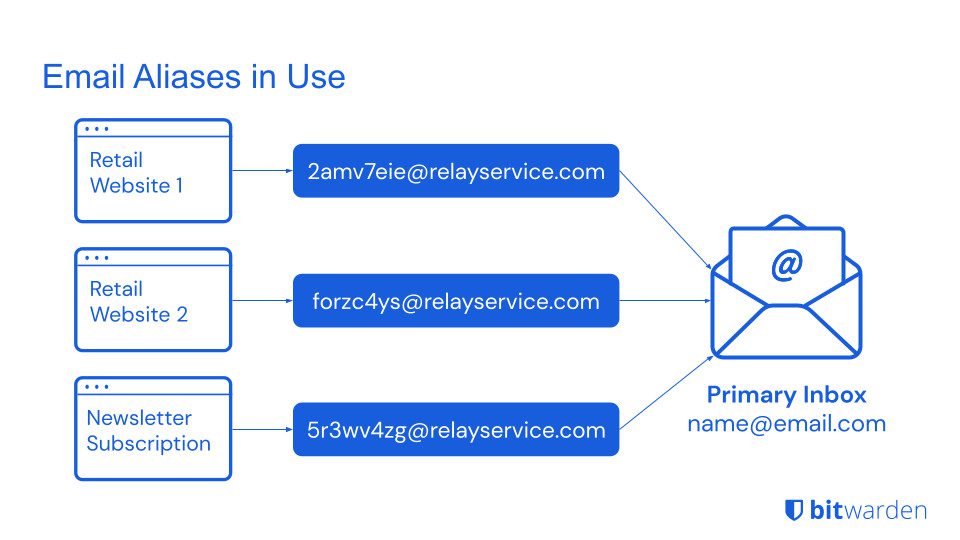
Most people use one primary email address for their bank, their healthcare portal, their social accounts, and their shopping. Experts call this the “master key” problem, and treat it as one of the highest-leverage weaknesses a person can have — because if that inbox is compromised, an attacker doesn’t just get one account. They can trigger password resets across every service that trusts that address as proof of identity.
This matters more in 2026 because AI-written phishing is personalized at scale, pulling details from LinkedIn, Instagram, and public records to produce a message that reads like it genuinely came from your bank. Peer-reviewed research on fully AI-automated spear-phishing found it converts on par with attacks written by skilled humans — 54% click-through in both cases, against a 12% baseline for generic phishing — without a human writing each one.
This isn’t a new observation, but generative AI has changed its scale. Years of accumulated searches, clicks, watch time, and location history are now raw training material for models built to predict — and nudge — future behavior.
| What you think you’re getting | What’s actually being exchanged | Second-order use |
|---|---|---|
| Free email service | Behavioral signals, contact graph, content patterns | Ad targeting, risk scoring |
| Free navigation app | Real-time location, movement patterns, dwell time | Footfall data sold to commercial clients |
| Free social platform | Emotional response data, social graph, political signal | Model training, ad targeting |
| Free AI assistant | Query content, uploaded files, conversation patterns | Possible model fine-tuning; breach exposure |
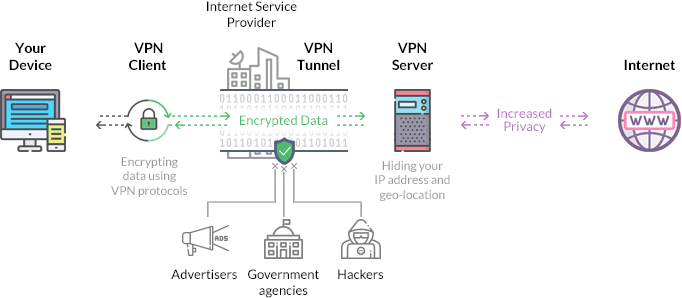
| Free, low-quality VPN | Your actual browsing traffic | Sold to data brokers — the opposite of the promise |
Experts apply a simple filter: assume the exchange is happening, and spend thirty seconds figuring out which data and with what safeguards — instead of assuming a privacy policy nobody reads has already answered the question.
Security researchers monitoring breach data absorbed roughly 23 billion stealer-log records, including 1.3 billion previously-unseen unique passwords, into public databases in late 2025 alone. Separately, Specops’ 2026 Breached Password Report analyzed more than 6 billion passwords stolen by malware in 2025 — six times what it found the year before. Microsoft’s Digital Defense Report puts the scale in blunt terms: more than 97% of identity attacks in 2025 were password attacks, and identity-based attacks surged 32% in the first half of the year. Verizon’s most recent Data Breach Investigations Report found stolen or compromised credentials were the initial access point in 22% of confirmed breaches, and involved in 88% of attacks against basic web applications specifically.
This is the blind spot most people haven’t confronted yet, and it’s also the one with the most severe individual downside. The FBI’s Internet Crime Complaint Center dedicated a standalone section to AI-related fraud for the first time in its 25-year history in the 2025 annual report: 22,364 complaints and $893 million in adjusted losses, a figure the Bureau itself calls conservative, since AI is only counted when a victim recognizes and reports it. Within that total, investment fraud accounted for $632 million, business email compromise with a confirmed AI component for $30 million, and romance and confidence scams for $19 million.
McAfee’s testing found a convincing voice clone needs as little as three seconds of source audio to hit around 85% accuracy, rising to 95% with more training data. In its global survey of 7,000 people, roughly one in four had experienced an AI voice-cloning scam personally or knew someone who had, and among people who received a message from a clone, 77% lost real money, not just time. On the enterprise side, Gartner’s September 2025 survey of 302 cybersecurity leaders found 62% of organizations had experienced at least one deepfake-enabled attack in the prior twelve months — 43% involving audio calls, 37% involving video. The clearest documented individual case remains the engineering firm Arup, whose Hong Kong finance team wired $25.6 million after a video call in which every other participant — including the person appearing to be the CFO — was a deepfake.
Default app permissions, default browser tracking behavior, and default cloud-backup settings are shipped by companies whose business often depends, at least partly, on data collection. Experts audit their defaults on a fixed schedule instead of accepting them once at setup and forgetting about them. The highest-impact changes take about five minutes combined and require no technical background:
- Revoke microphone and location access from apps that don’t functionally need it
- Switch to an encrypted DNS resolver to stop your provider from logging every site you query
- Turn off ad personalization at the operating-system level, on both mobile platforms
- Enable link-tracking protection, now built into modern browsers by default
- Review which apps hold access to your contacts — that graph is rarely necessary and highly valuable to lose
As AI systems fold themselves into search, email drafting, and customer service, many people treat their output as settled fact. Experts treat it differently: these systems are trained on historical data, can be shaped toward outcomes their operators prefer, and don’t reliably distinguish between what’s true and what’s simply stated often. Verizon’s own 2025 breach data adds a workplace angle worth knowing personally too: among employees using generative AI tools on personal or corporate devices, 72% accessed them through personal accounts rather than authenticated, monitored ones — a habit that quietly moves sensitive data outside any organization’s visibility, and the same habit shows up in personal use.
§4Score Your Own Exposure
Reading about seven blind spots is one thing; knowing where you personally stand against them is another. This is an original scoring model built for this briefing — the Personal Attack Surface Score — mapped directly to the seven exhibits above. Check what’s true for you and see where you land.
Personal Attack Surface Score
Check every box that’s currently true for you. Lower is better — this measures exposure, not virtue.
§5How They Compound Into One Attack
These seven items aren’t independent. In a real incident, they stack — each blind spot widens the next one. Here’s the anatomy of a typical 2026 compromise, reconstructed from the pattern that shows up across FBI, Verizon, and Gartner incident data:
Each blind spot looks manageable on its own. Together, they form a chain — and experts take the chain seriously precisely because they can see the whole thing, not just the link in front of them.
§6The Two-Hour Countermeasure Kit
Closing all seven blind spots completely would take real time and technical investment. Closing roughly 80% of the realistic exposure takes about two hours of setup. Here’s the minimal kit an expert would hand a non-technical friend in 2026:
The Non-Technical Expert Stack
§7Myth vs. Fact
Six claims that circulate constantly in comment sections and forwarded messages — and what the verified data actually says.
“I’m not important enough to be a target.”
Most 2026 attacks are automated and target volume, not individuals. AI-written phishing costs almost nothing to send at scale — you don’t need to be notable, just reachable.
“A strong, complex password is enough.”
Uniqueness matters more than complexity. Credential stuffing tools test a leaked password against hundreds of other services within minutes of a breach, regardless of how strong it was.
“Deepfake voice scams are still rare and unconvincing.”
Three seconds of audio produces an 85% voice match, and 70% of people say they couldn’t tell a clone from the real thing. Over 60% of surveyed organizations had already faced a deepfake-enabled attack by late 2025.
“Passkeys are still an early-adopter feature.”
5 billion passkeys are active worldwide and 75% of consumers have enabled at least one, per FIDO Alliance’s 2026 report — this is mainstream infrastructure, not a beta feature.
“Free VPNs and free privacy tools are basically the same as paid ones.”
An unaudited free VPN can itself be the party monetizing your traffic. Independent, published audits are the meaningful signal — not the price tag alone.
“AI chatbots are neutral, fact-checked sources.”
AI assistants are trained on historical data and can be shaped by their operators. Treat their output as a well-informed first draft, not a verified answer, on anything with real financial or safety stakes.
§8What This Briefing Can’t Fix
A briefing that doesn’t name its own limits isn’t a briefing — it’s marketing. Here’s what the stack above doesn’t solve:
- Friction is real. Email aliasing adds a step at every sign-up. Migrating to a password manager takes a genuine one-time effort. Some people won’t maintain either, and that’s a realistic outcome worth planning around, not a moral failing.
- No stack is complete. This kit reduces mass-market and opportunistic risk substantially. It does not protect against zero-day exploits, compromised hardware, or a resourced, targeted adversary.
- Privacy and convenience are genuinely in tension. The most frictionless digital experience is almost always the least private one. Experts accept that trade-off consciously. Most people never get the chance to make it consciously at all.
- Regulation is improving but incomplete. Global data protection law now covers a majority of the world’s population on paper, according to IAPP’s ongoing tracking, but enforcement is uneven and still lags the pace of the technology it’s meant to govern.
§9Debrief: Frequently Asked Questions
§10Glossary
- Passkey
- A cryptographic credential stored on your device that replaces a typed password; authentication happens locally and can’t be phished the way a password can.
- Credential stuffing
- Automated testing of a leaked username/password pair against many other services, betting on password reuse.
- Voice cloning
- Using AI to generate synthetic speech that mimics a specific person’s voice from a short audio sample.
- Email aliasing
- Generating a unique, disposable forwarding address for each sign-up so your real inbox address is never exposed.
- Encrypted DNS
- A DNS resolver that encrypts your site-lookup requests so your network provider can’t log every domain you visit.
- Business email compromise (BEC)
- Fraud in which an attacker impersonates a trusted contact, often an executive, over email to trigger a wire transfer or data disclosure.
§11Closing Assessment
Here’s the part most articles in this space avoid saying plainly: the modern data economy has spent two decades making collection as frictionless and invisible as possible. The default experience — on any platform, with any free service — is optimized for what it collects, not what it protects.
That’s not a conspiracy. It’s a business model, and it’s entirely predictable once you understand it.
The knowledge in this briefing isn’t secret. It’s just rarely delivered at the one moment it would actually change a decision — when someone installs a new app, signs up for a new service, or answers a call from a number that looks familiar. Experts have it because they’ve watched the downstream effects up close. Most people never get that vantage point handed to them.
The choice isn’t whether to use digital services. It’s whether to use them on the terms set by default, or on terms you’ve deliberately chosen. That gap is exactly the one this briefing was written to close.
Stay ahead of what’s actually happening in tech
We publish analysis that goes beneath the surface — no sponsored placements, no affiliate links, no headline that just repeats what everyone else already said.
Explore FutureNow →Primary sources
- FIDO Alliance — State of Passkeys 2026 (May 2026)
- FBI Internet Crime Complaint Center (IC3) — 2025 Internet Crime Report (published April 2026)
- Verizon — 2025 Data Breach Investigations Report
- McAfee — AI voice-cloning research, global 7,000-person study
- Gartner — September 2025 survey of 302 cybersecurity leaders on deepfake-enabled attacks
- IAPP — Global Privacy Law and DPA Directory, ongoing tracking (2026)
- Heiding, F. et al. — human-subjects study on AI-automated spear-phishing click-through rates, Harvard-affiliated research via arXiv
- HaveIBeenPwned / Synthient — stealer-log and credential-stuffing dataset loads, October–November 2025
- Specops Software — 2026 Breached Password Report
- Microsoft — Digital Defense Report 2025
Secondary sources
- Descope — 2026 FIDO Report analysis
- MojoAuth — Passwordless & passkeys 2026 adoption data
- Abnormal AI — 2025 IC3 report analysis
- SpyCloud — Verizon 2025 DBIR breakdown
- Keepnet — Deepfake statistics 2026