
Technology · Deep Dive · Updated May 2026
The Secret Technologies Powering Your Favorite Apps (That You Never See)
Every tap, swipe, and notification depends on a hidden machinery most people never think about. Here’s what’s actually running under the hood — and why it matters more than ever in 2026.
- Every app you use runs on 5–12 invisible infrastructure layers you never interact with directly.
- CDNs explain why Instagram loads in milliseconds. WebSockets explain why WhatsApp messages appear instantly. Edge functions explain why apps feel snappy in Tokyo and Toronto alike.
- Third-party SDKs silently collect device fingerprints — often without explicit user consent.
- On-device AI is replacing cloud calls for speed and privacy, shifting power from servers to your phone.
- Understanding these layers makes you a smarter user, developer, and digital citizen.
Should You Even Read This?
| You Are… | What You’ll Get | Read? |
|---|---|---|
| A curious non-technical user | Clear explanations of tech you use every day without knowing | Yes |
| A junior developer | Mental models for infrastructure choices you’ll face | Yes |
| A product manager | Vocabulary to have real conversations with your engineering team | Yes |
| A senior backend engineer | Useful framing; the depth here is conceptual, not implementation-level | Optional |
| Someone who wants to stay in blissful ignorance | You’ll lose that option after the first section | Proceed with caution |
The Invisible Machine
You open Spotify. A song starts playing in under a second. You didn’t think about it. You shouldn’t have to think about it. But somewhere between your thumb touching glass and that first note hitting your ears, a request traveled from your phone to a server cluster, authenticated your account, checked your region’s licensing, retrieved the audio file from a geographically optimized cache, and streamed it back — all while updating your “recently played” queue in real time.
That’s not magic. That’s infrastructure. And virtually none of it is visible to you by design.
The digital products we call “apps” are, at their core, thin interfaces layered on top of vast, invisible systems. The interface is the 10% you see. The stack is the 90% you don’t. And that 90% — the content delivery networks, the WebSocket connections, the third-party SDKs, the edge functions, the on-device AI models — is what separates a $10 app from a billion-dollar platform.
“The best technology disappears. The worst technology is what you notice because it’s slow, broken, or invasive.”
— A principle that defines every app layer described below
This is a guide to the invisible machine. Not a developer manual — a clear-eyed explanation of the technologies running under every app you use, why they exist, what they actually do, and what they reveal about the companies building them.
CDNs: Why Your Photos Don’t Lag
A Content Delivery Network (CDN) is, at its simplest, a globally distributed set of servers that store copies of your data close to where you are. When you open Instagram in Paris, you’re not reaching a server in California. You’re reaching a cache node somewhere in Western Europe, milliseconds away.
Without this, every user on earth would compete for bandwidth from one or a handful of central servers. The internet as we experience it would be impossible. Every image, every video, every JavaScript file would take seconds to load instead of fractions of a second.
Why CDNs are more important in 2026 than ever
CDNs used to be primarily about images and video. In 2026, they handle a much wider surface: JavaScript bundles, API responses, authentication tokens, even entire server-rendered HTML pages. Platforms like Vercel and Netlify have made CDN-based deployment the default for web applications — what used to require dedicated DevOps teams now happens automatically with a git push.
The shift matters because it changes how you think about latency. Slow apps used to mean slow servers. Today, a slow app often means a poorly configured CDN — content cached in the wrong region, cache rules set too aggressively or not aggressively enough, or files bypassing the cache entirely due to misconfigured headers.
WebSockets: The Heartbeat of Real-Time Apps
Traditional web requests follow a pattern: you ask, the server answers, the connection closes. This is fine for loading a webpage. It’s terrible for a live chat app, a stock ticker, or a collaborative document.
WebSockets solve this by keeping the connection open. Instead of knocking on the door and leaving, your app maintains a persistent two-way channel with the server. Either side can send data at any time, instantly.
Messaging Apps
WhatsApp, Telegram, and Slack use WebSockets so messages appear the instant they’re sent — no polling, no delay.
Live Dashboards
Trading platforms and analytics tools push data changes to your screen without you refreshing anything.
Live Gaming
Multiplayer games use WebSockets (or the lower-level WebRTC) to synchronize game state across all players in near-real-time.
The alternative: Server-Sent Events
WebSockets are bidirectional. But many use cases only need the server to push updates to the client — not the other way around. For those scenarios, Server-Sent Events (SSE) is a lighter, simpler option. This is increasingly relevant in 2026 because SSE is the protocol powering streaming AI responses — the text appearing word-by-word as an AI model generates it is an SSE stream.
Edge Computing: The Internet Moves Closer to You
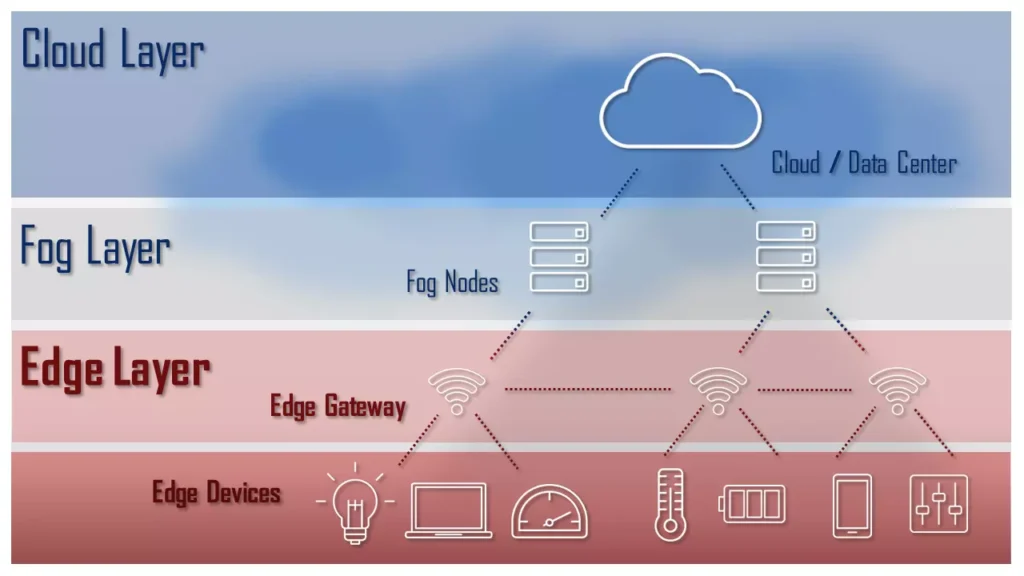
CDNs cache static content near users. Edge computing goes further: it runs actual code near users. Instead of your app sending a request to a central server in Virginia and waiting for a response, edge functions execute in a data center minutes away — processing the logic, running authentication checks, or rendering HTML before it reaches you.
Platforms like Cloudflare Workers, Vercel Edge Functions, and Deno Deploy have made this accessible to teams of any size. What was once enterprise-only infrastructure is now a configuration setting.
Edge computing is the right choice if:
- Latency is your primary constraint — authentication, routing, and A/B testing are natural edge candidates
- Your users are globally distributed — edge collapses the geography gap
- Your function is stateless — edge nodes don’t share memory; complex stateful logic still belongs on origin servers
- You’re paying for bandwidth — edge can terminate requests early, reducing origin load
Stick to traditional servers if:
- You need persistent connections — long-running processes aren’t suited for edge environments
- You’re working with large databases — edge nodes have limited local storage access
- Cold start latency matters — edge functions can have cold starts too, particularly on lower-traffic routes
- Compliance requires data residency — edge distribution may violate data sovereignty rules in certain jurisdictions
SDKs: The Pre-Built Lego Blocks Inside Every App
An SDK (Software Development Kit) is a package of pre-written code that lets developers add a capability to their app without building it from scratch. Payment processing, push notifications, crash reporting, analytics, maps, authentication — virtually every non-trivial feature in a modern app is powered by at least one SDK.
When you use Uber, the map is powered by Google Maps SDK. The payment is Stripe SDK. The push notification infrastructure is APNs (Apple) or FCM (Google). The crash reporting is probably Sentry or Firebase Crashlytics. Uber’s developers didn’t build any of those things — they integrated them.
Why SDKs are increasingly a privacy and security concern
This isn’t theoretical. A June 2025 research paper from Google researchers analyzed thousands of mobile SDKs and found fingerprinting practices far beyond what’s typically disclosed in developer documentation. The study found that many SDKs collect device signals — battery level, screen orientation, installed fonts, accelerometer data — and combine them in ways that can uniquely identify a device across apps and sessions.
The uncomfortable truth: when you install an app, you’re also installing every SDK that app uses. And those SDKs may have their own data practices, their own update cycles, and their own commercial interests that differ from the app developer’s.
Device Fingerprinting: The Identifier You Never Agreed To
Cookies have a consent dialog. Device fingerprinting doesn’t.
A device fingerprint is a unique profile built from dozens of signals your device emits passively: your browser version, installed plugins, screen resolution, GPU capabilities, system fonts, audio processing characteristics, and more. None of these signals are individually identifying. Combined, they create a signature that remains consistent even when you clear your cookies, use a VPN, or switch browsers.
How to tell if an app is fingerprinting you
For mobile apps, it’s nearly impossible to detect without network analysis tools. For websites, browser developer tools can reveal fingerprinting scripts — look for JavaScript accessing the Canvas API, WebGL renderer information, AudioContext, or font enumeration. Privacy policies that mention “device recognition” or “cross-device tracking” are strong indicators.
The honest framing: fingerprinting exists on a spectrum. Some uses are benign — fraud detection legitimately needs to identify suspicious devices. But the same technology that stops a fraudster can also build a behavioral profile of a legitimate user without their knowledge.
On-Device AI: The New Frontier
Until recently, AI features in apps worked like this: your app sent data to a cloud server, a model processed it, and a result came back. This worked, but it had obvious costs — latency, bandwidth, privacy exposure, and cloud compute bills.
2025–2026 marked a meaningful shift: AI is increasingly running on your device, using the neural processing units (NPUs) now built into flagship chips from Apple, Qualcomm, and Google. Apple’s Core ML, Google’s ML Kit, and TensorFlow Lite allow developers to run capable models locally — object recognition, speech transcription, text summarization — with no internet connection required and no data leaving the device.
Voice Recognition
iOS transcribes speech entirely on-device using Core ML. No audio clip ever reaches Apple’s servers in standard operation.
Photo Intelligence
Face recognition, scene classification, and object search in your photo library all run locally on modern iPhones and Pixels.
Keyboard Prediction
Next-word prediction in system keyboards has been on-device for years. In 2026, it’s increasingly personalized using small language models.
Private Computing
Health data analysis, financial document scanning, and sensitive communications processing — these are moving on-device for privacy-first reasons.
In March 2026, DataSapien launched a dedicated SDK for building on-device AI apps targeting iOS, Android, React Native, and Flutter — signaling that this capability is moving from platform-native to a general development primitive available to any app team.
How All This Actually Works Together
These aren’t independent technologies. They compose into a system. Here’s what happens when you send a voice message on a modern messaging app:
Your microphone captures audio. An on-device SDK transcribes it locally for the preview text you see. No cloud call yet. Privacy preserved.
Before the message leaves your device, your session token is validated by an edge function in a regional data center. Latency: ~10ms. The origin server is never touched for auth.
The audio file and metadata travel through a persistent WebSocket connection to the origin. The server pushes the message to the recipient’s open WebSocket channel — delivery is near-instant.
The audio file is stored in object storage and pushed to CDN nodes near the recipient. When they tap play, the file loads from a cache server nearby, not from the origin.
A third-party analytics SDK logs the interaction — message type, duration, engagement — to a remote collection endpoint. This happens invisibly. The data contributes to a behavioral profile neither of you explicitly consented to sharing.
That’s five layers of invisible infrastructure in a single “send voice message” action. The integration is so seamless most developers don’t consciously map it. Users certainly don’t.
The 80% Stack — What Most Apps Are Built On
If you stripped away the company-specific logic from the top 100 consumer apps and looked at the underlying infrastructure, you’d find remarkable convergence. This is the layer most apps share:
Decision Framework: What This Means for You
If you’re a user
| You care about… | What to look for | Action |
|---|---|---|
| Privacy | How many third-party SDKs does this app use? Does it request permissions it doesn’t need? | Use a network traffic analyzer app; review privacy labels on the App Store |
| Performance | Does the app feel slow on cellular vs. WiFi? May indicate poor CDN coverage | Report or switch — poor CDN config is an engineering choice, not an inevitability |
| Security | Does this app handle payments via its own checkout or a known SDK like Stripe? | Prefer apps using reputable payment SDKs; never enter card details in webviews |
If you’re a developer or product manager
| Scenario | Best Layer to Optimize | Typical Gain |
|---|---|---|
| App feels slow globally | CDN coverage + edge functions for auth | High impact |
| Chat/notifications feel delayed | WebSocket architecture review | High impact |
| Privacy complaints from users | SDK audit — remove unnecessary analytics SDKs | Medium impact |
| Cloud AI costs are high | On-device inference for frequent, simple tasks | Medium impact |
| Security incident via dependency | Supply chain audit of all third-party SDKs | Critical |
Limitations and Hard Truths
The invisibility is by design, and that’s both feature and bug. Infrastructure that disappears into the background creates seamless experiences. But it also creates a massive information asymmetry between app developers and users. Most people have no meaningful way to audit what an app is doing at the SDK level.
Regulation is trying to catch up, imperfectly. GDPR, CCPA, India’s DPDP Act — these regulations require consent for data collection, but they rarely require disclosure of which third-party SDKs are present or what those SDKs collect. An app can technically be GDPR-compliant while still embedding analytics SDKs that fingerprint every user.
Edge computing doesn’t solve the privacy problem. Running code closer to users reduces latency, not data collection. An edge function can log your behavior as efficiently as an origin server can — it just does so faster.
On-device AI is not automatically private. A model that runs locally can still log inputs and outputs to a cloud analytics endpoint. “On-device inference” and “data leaving your device” are independent questions. Ask both.
Frequently Asked Questions
What exactly is a CDN and do I need one for a small website?
What’s the difference between a WebSocket and an API call?
How do I know which SDKs are inside an app I’m using?
Is device fingerprinting illegal?
What is edge computing and how is it different from cloud computing?
Does on-device AI mean my data never leaves my phone?
How many third-party SDKs does a typical app contain?
Can I build a real app without third-party SDKs?
Final Thoughts
There’s a version of this article that ends with a neat summary and an encouraging call to action. That version would be dishonest.
The harder truth is this: the infrastructure powering your apps is astonishing in its elegance and genuinely impressive in its scale. The same infrastructure is also the substrate for data collection practices most users would object to if they understood them. Those two things are inseparable. They are not a bug in the system. They are the business model of the system.
Understanding CDNs, WebSockets, edge computing, and on-device AI makes you a more informed user and a better developer. But it doesn’t resolve the underlying tension between seamless experience and transparent data practices. That tension is, as of 2026, still largely unresolved — by regulators, by platform companies, and by most app developers.
The question worth sitting with: if every app had to surface its full SDK list, its data flows, and its fingerprinting behavior to users at install time — in plain language, not legal boilerplate — how many of the apps on your phone would you still install?
That question is both a useful design heuristic and an uncomfortable political one. The technology to answer it clearly already exists. The incentive to deploy it, for most companies, does not.
Primary Sources
- NowSecure: Inside Mobile App Fingerprinting: What Your Apps Know About You — December 2025
- The New Stack: New Mobile SDK Brings Low-Code Development to On-Device AI — March 2026
- itiTans: Top 20 Web Application Development Trends 2025
Secondary Sources
- Progriso: Mobile App Trends 2026: Top 12 Technologies to Watch
- Contentful: Everything You Need to Know About SDKs and APIs
- Atomicmail: How Google Tracks You: Digital Fingerprinting Update 2025