


15 Digital-Life Systems Worth Actually Setting Up (2026)
- Most of this list is not secret advice — it’s well-known, table-stakes stuff. What’s different here is the mechanism behind each item and an honest note on where it breaks.
- The real product of this guide is the three-layer framework below: Foundation → Efficiency → Leverage. Trying to do all 15 at once is why most tech-tip lists don’t stick.
- The clearest update since 2022–2024: passkeys are now mainstream, but they are not a strict upgrade over hardware keys for every threat model — see item 3.
- Where the evidence is thinner than the confident tone of most articles suggests, it’s labeled Probable rather than Established, and cited.
Should You Even Do This?
Don’t try all 15 at once. Pick your worst bottleneck and go deep there first. Shallow effort spread across everything produces nothing you’ll notice in six months.
The Framework: Foundation → Efficiency → Leverage
This is the actual organizing idea behind the list below, so it’s worth reading before the items themselves rather than after. Each layer depends on the one before it — trying to layer AI workflows (Leverage) on top of a compromised account or a chaotic file system (Foundation, Efficiency) is why a lot of “AI productivity setups” don’t survive contact with a bad week.
Three-Layer Stack
Foundation removes risk. Efficiency removes friction. Leverage multiplies output. In that order — not reversed. This is a “crawl, walk, run” hierarchy, not a new invention — the same logic sits behind maturity models in security, ops, and personal-finance advice (“emergency fund before investing”). What’s specific here is just applying that familiar sequencing to this particular list, so it’s usable rather than restated as trivia.
Nothing else matters if an account is compromised or data is quietly leaking. One 2–4 hour session, then ~30 min/quarter.
Reduces daily friction once the foundation is secure. Most immediately noticeable layer. Implement one category at a time.
Multiplies output — but only once the first two layers are in place. This is where most people start, which is usually the mistake.
| Layer | Setup Time | Maintenance | Primary Gain |
|---|---|---|---|
| Foundation (1–5) | 2–4 hours | ~30 min / quarter | Reduced risk |
| Efficiency (6–10) | 1–3 hours / item | ~15 min / week | Focus, speed |
| Leverage (11–15) | Ongoing, incremental | Low | Output multiplier |
Foundation: Security & Privacy (1–5)
The Password Manager’s Value Is the Audit Report, Not the Vault
Most people set up a password manager, import old passwords, and stop — leaving the actual risk untouched. The audit feature (weak/reused/breached passwords) is what closes the gap, and it needs to be run, not just available.
The mechanism: attackers mostly don’t guess passwords. They buy leaked username/password pairs and test them across other sites — credential stuffing. A unique password per account defeats this attack category regardless of how strong any single password is.
Email Aliasing Identifies the Source of Every Leak
A unique email alias per service (SimpleLogin, Apple’s Hide My Email) means that when spam starts on one alias, you know exactly which company leaked or sold your data — and can kill just that alias.
Passkeys Are the New Default — But Not a Strict Upgrade Over Hardware Keys
Passkeys — phishing-resistant, passwordless credentials built on FIDO2/WebAuthn — are now supported across every major platform. Amazon alone confirmed over 320 million customers using passkeys as of August 2025, up from 175 million a year earlier.
For most people, a passkey is now the best default for everyday accounts: it can’t be phished the way a typed code can, and needs no separate hardware. But it isn’t automatically superior to a physical hardware key for every threat model. A synced passkey lives inside your Apple, Google, or Microsoft account — so someone who compromises that account can, in principle, reach the passkey too. A hardware key’s private key never leaves the device and can’t be reached that way. For journalists, activists, admins of sensitive systems, or anyone facing targeted attacks rather than mass phishing, a device-bound hardware key or device-bound passkey is still the stronger choice.
Practical hierarchy for 2026: passkey or hardware key (pick based on threat model) > TOTP authenticator app > SMS. SMS remains weakest — NIST’s current digital identity guidelines now classify SMS one-time codes as a “restricted authenticator,” not a recommended one.
Incognito Mode Was Never About Hiding From Google — Only From the Person Next to You
Incognito hides your history from other people using the same device. It was never designed to hide your IP, your ISP-level traffic, or your identity from sites you’re logged into — Google never claimed otherwise in the product itself, which is part of what the underlying lawsuit turned on.
Google’s Incognito-tracking class action (filed 2020) was settled in December 2023 and finalized in April 2024. The case centered on data collected through Google Analytics and Ad Manager on third-party sites visited while in Incognito mode — not on a failure of Incognito’s stated local-privacy function. The final settlement included no cash payment to users; Google agreed to delete a large volume of previously collected data, stop using an undisclosed internal signal that detected when someone was in Incognito mode, and let users block third-party cookies by default for five years. Individual users retained the right to sue separately.
For genuine network-level privacy — hiding activity from an ISP or from tracking scripts — pair a privacy-respecting DNS resolver with a browser that has fingerprinting protection (Firefox strict mode, Brave) and a reputable VPN on untrusted networks.
App Permissions Are a Slow Leak — Review Yearly
Permissions accumulate silently; an old flashlight app with lingering location access is a forgotten passive leak. Both iOS and Android now show a permissions timeline, not just current status. Twenty minutes once a year, revoking what an app doesn’t clearly need, closes most of this.
Efficiency: Workflow & Files (6–10)
Context-switching costs are well studied. The commonly cited figure — from Gloria Mark’s research on interrupted work at UC Irvine — puts full-focus recovery after an interruption at around 20+ minutes, a range that has held up across multiple follow-up studies of knowledge workers. Most digital workers face dozens of interruptions daily; the items below attack that cost at the source.
Notification Triage, Not Blanket Silence
Allow only direct-contact alerts — calls and messages from specific people — and kill every algorithmic notification (likes, “recommended,” “see what you missed”). Algorithmic notifications run on variable-reward psychology, the same mechanism behind slot machines; direct-contact notifications are actual human signals.
Email Bankruptcy Is a Legitimate Strategy
If your inbox has thousands of unread messages, “inbox zero” will cost 40+ hours you don’t have. Archive everything older than 30 days in one pass, set filters going forward, and use three labels: Action, Waiting, Reference. Nothing disappears — search still works on archived mail.
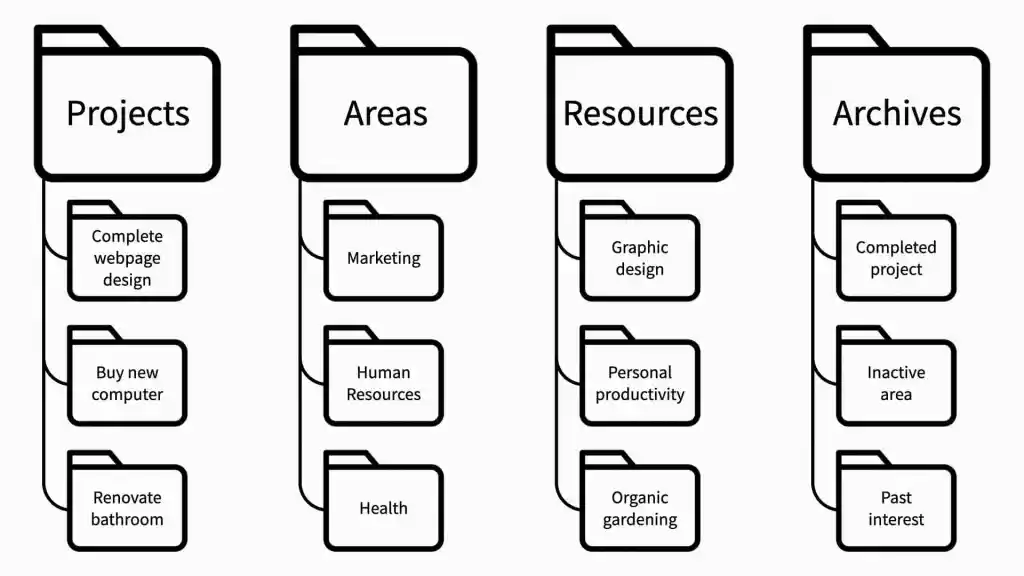
PARA: The Folder Structure Organized by Actionability, Not Topic
Most folder systems collapse because they’re organized by topic instead of status. PARA — Projects, Areas, Resources, Archive, from Tiago Forte — maps to whether something is active, an ongoing responsibility, reference material, or done. Finished work moves to Archive instead of getting deleted, becoming a searchable history over time.
Keyboard Shortcuts Compound — Only the Five You Actually Repeat
Don’t memorize fifty shortcuts. Identify your five most-repeated manual actions and learn only those. An action performed 20 times a day, saving 8 seconds each time, is about 2.5 minutes a day — roughly 15 hours a year from five shortcuts alone.
Cloud Sync Is Not a Backup
Google Drive, iCloud, OneDrive, and Dropbox sync: delete or corrupt a file, and that change propagates everywhere within seconds. A real backup is versioned, isolated, and needs a deliberate restore step. The standard rule is 3-2-1: three copies, two media types, one offsite. Most sync services only retain limited version history — typically 30–180 days.
Leverage: AI, Automation & Mindset (11–15)
Context Front-Loading Beats Clever Phrasing
Before a complex AI request, state your role, your audience, your constraints, and what a failed answer looks like. That context shapes the output more than any single instruction: “I am [role]. My audience is [audience]. The goal is [goal]. Don’t [failure mode].”
AI Hallucination Clusters in Predictable Places
AI tools are most likely to fabricate on specific statistics, very recent events, niche citations, and obscure or private entities. They’re most reliable explaining established concepts, generating structure, summarizing your own text, and working through logic. Verify anything near the risky end before relying on it.
Automation ROI Should Be Calculated, Not Assumed
Before automating anything: hours saved per year ÷ hours to build it. An email filter saving 10 min/week (≈8.7 hrs/year) that takes 45 minutes to set up returns ~11.6x. A report automation taking 12 hours to build but saving 2 hrs/year never pays back. Automate frequent-and-simple first.
Your Attention Is a Product — Use Platforms as Utilities, Not Environments
Any app built around an algorithmic feed profits by converting attention into ad revenue — that’s the disclosed business model, not cynicism. Practical implication: get specific information, then leave, rather than browsing until bored.
Maintainable Beats Optimal — Subtract Before You Add
A consistently maintained simple system beats a theoretically perfect one abandoned in sixty days. Before adopting anything new, ask: “Can I keep this running in my worst week?” Just as often, the higher-leverage move is removing an app or step that creates work without creating value — run a quarterly subtraction audit rather than only ever adding tools.
The 80% Solution Stack
You don’t need forty apps. This is the minimal stack covering the most ground with the least complexity.
Password manager with passkey support
Unique generated passwords plus passkey storage where supported. Run the weak/reused audit every 90 days.
Email alias service
One alias per new signup. Know exactly where your data went when spam starts.
PARA-organized file structure
Projects, Areas, Resources, Archive — set up once, reviewed monthly.
Cold backup, separate from sync
Automatic, versioned, offsite. Test a restore once a year — almost nobody does.
AI thinking partner
Used for outlines and pressure-testing ideas, not for producing final output untouched.
Limitations & Trade-offs
- Privacy tools add friction. Aliases require tracking, and any strong authentication method needs a working recovery path before it’s needed.
- Automation creates fragility. It breaks when an underlying app changes an API or removes a feature. Keep a manual fallback you actually remember how to run.
- Specific tool recommendations age fast; the mechanisms don’t. Context front-loading and the hallucination map will still hold in a year. Which app is “best” won’t.
- Nothing here is a secret. Most of this is well-documented, widely available advice. What differs is whether it’s actually implemented and maintained — that’s the part almost everyone skips.
- This is still a numbered list. Telling you not to do all 15 at once doesn’t fully resolve the tension of using a listicle format to argue against listicle thinking. The honest framing is that the numbering exists for scannability, not because any of this needs to be exactly 15 things — treat the count as packaging, and the Foundation/Efficiency/Leverage grouping as the actual content.
Frequently Asked Questions
Correction Ledger
Visible changes from the previous version of this article, per our editorial standard.
Final Thoughts
The honest version of this list’s thesis: the biggest obstacle to a better digital setup isn’t a missing tool — it’s that almost none of this is actually secret, and almost none of it gets fully implemented anyway.
Every item here requires a decision: set it up, maintain it, change a habit. The technology is the easy part. Follow-through is where these things quietly die around week three — and no amount of dramatic framing changes that.
The people with the best digital setups generally aren’t using the most sophisticated tools. They’re using simple tools with consistent habits, and they subtract, without much sentimentality, anything that stops earning its place.
Pick three items from this list. Set them up properly. Run them for sixty days. Then come back for three more.
Sources & References
- Electronic Frontier Foundation — Privacy Tools & Browser Fingerprinting
- NIST Digital Identity Guidelines, SP 800-63B — restricted-authenticator classification for SMS one-time codes
- FIDO Alliance — passkey and FIDO2/WebAuthn adoption reporting
- Amazon — official passkey adoption announcement; figure updated via Forbes, Aug. 2025
- Tiago Forte, Building a Second Brain — PARA method, fortelabs.com
- Gloria Mark, UC Irvine — interrupted-work and context-switching research, CHI conference proceedings
- Chasom Brown, et al. v. Google LLC, No. 4:20-cv-03664 (N.D. Cal.) — settled Dec. 2023, finalized April 2024; AP via PBS, TIME