
5 Time-Saving Habits That Actually Reclaim Your Week in 2026
The average knowledge worker loses more than 21 hours weekly to interruptions, context switching, and cognitive fragmentation — not laziness, not bad tools. Here’s the structural fix the motivation-hack articles skip entirely.
I’ll be honest: I ignored most of this research for years. I figured the “23 minutes to refocus” statistic was one of those numbers that circulates because it’s dramatic, not because it’s real. Then I ran a simple experiment — a week where I logged every interruption and how long it actually took me to get back to quality output. The numbers were worse than the research. Not better.
That’s when I started taking the cognitive fragmentation problem seriously. And it turns out the mechanism isn’t about willpower or discipline at all. It’s structural. The modern digital work environment is, essentially, an interruption machine — and the default settings optimize for responsiveness, not depth.
The five habits below aren’t motivational tools. They’re structural changes to when, how, and in what sequence you work. They work because they reduce the frequency and cost of switching, not because they help you try harder.
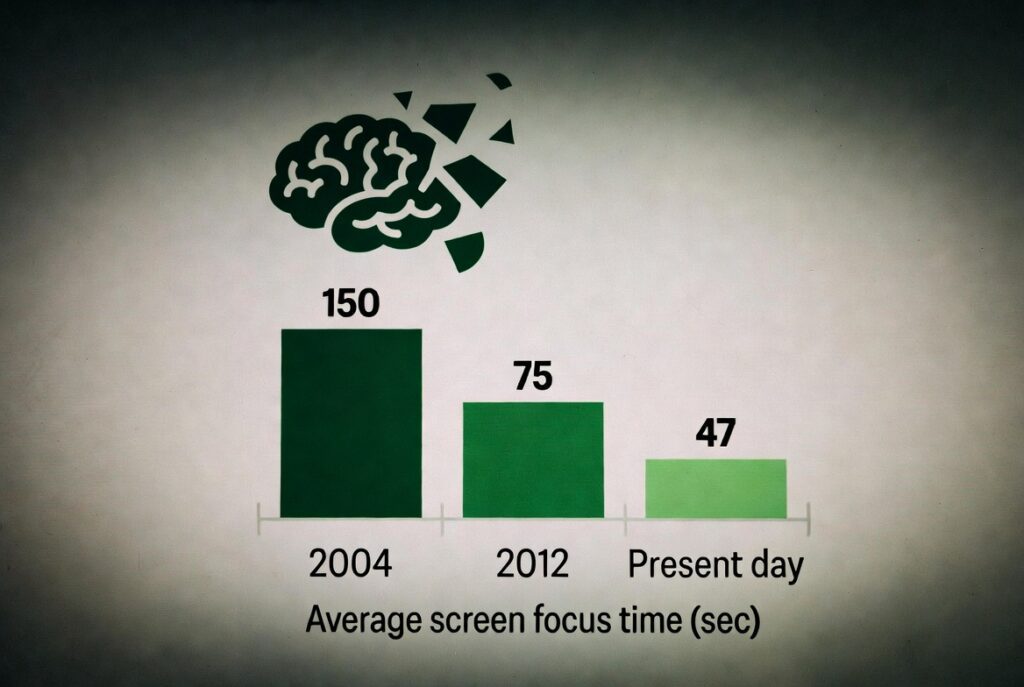
One important clarification before we get into the data: Gloria Mark’s oft-cited “23 minutes to refocus” figure comes from her 2008 UC Irvine study on significant interruptions in specific workplace contexts. Her more recent work, detailed in her 2023 book Attention Span, tells an even more uncomfortable story: the average time spent on any single screen before switching has fallen from 2.5 minutes in 2004 to just 47 seconds today. We didn’t get better at recovering from interruptions — we just started interrupting ourselves far more often.
Gloria Mark, UC Irvine / Attention Span, 2023
HBR, 2022 study of Fortune 500 teams
American Psychological Association
Dropbox / Economist Impact, 2023
Source: Gloria Mark, UC Irvine — Attention Span (Hanover Square Press, 2023). Corroborated by five independent studies 2014–2020. Note: this measures actual switching behavior in real work environments, not maximum attention capacity.
If attention fragmentation consumed 40% of your productive time and every recovery took 23+ seconds of minimum context-reload — even ignoring full refocus — you’d see why adding more to-do items doesn’t help. The five habits below reduce the frequency and cost of switching. That’s the lever.
The 30-Minute Sunday Reset
Eliminate Monday-morning chaos before it starts — one short planning session builds the decision filter your week needs
The reason Monday mornings feel like being hit by a truck isn’t workload — it’s the absence of a map. Without one, your brain manufactures urgency around whatever arrives first, usually email. You spend 20 minutes on something that isn’t actually your priority, then spend the next hour psychologically recovering from the drift and feeling behind before 10 AM.
I made this mistake for the first three years of running a distributed team. Every Sunday I’d think “I know what this week looks like” — and by Tuesday I’d have abandoned three of my intentions and picked up four things I didn’t plan for. The fix wasn’t discipline. It was building a short ritual that forced explicit prioritization before the week’s noise started.
The mechanism is simple: by pre-committing to your top three priorities before Monday arrives, you build a decision filter. When Tuesday’s “urgent” Slack message lands, you already know whether it belongs on your actual list — or whether it’s someone else’s urgency that your open schedule is absorbing by default.
Exactly how to do it
- Set a hard 30-minute timer. Perfectionism is the enemy of this ritual — you are building a filter, not a project plan.
- Open your calendar and task list. Name your top three priorities for the week. Not five, not ten. Three. If everything is a priority, nothing is.
- Block time for those three priorities before anything else — before meetings, before low-effort “quick wins” that feel productive but aren’t.
- Add recurring commitments (exercise, family time, grocery runs) to your calendar as non-negotiable blocks. Treat them exactly like client meetings.
- One-minute retrospective on last week: what consumed disproportionate energy and produced little? Move it, delegate it, or delete it this week.
The honest caveat: this doesn’t guarantee the week goes to plan. Life interrupts plans. The value is the filter, not the plan itself — when an unplanned demand arrives, you have something to measure it against instead of absorbing everything by default.
Keep it to one page — paper, Notion, Google Docs, or a note on your phone. The medium is genuinely irrelevant. The ritual is what works. After four consistent weeks, the format becomes automatic and the session shortens to 15 minutes without losing any of the value.
Batch Everything That Can Be Batched
Knowledge workers lose the equivalent of five full working weeks every year to app-switching alone — batching is the structural antidote
Here is what the research actually says — and it’s worth reading carefully because the numbers are bigger than the productivity-article summaries suggest. A 2022 Harvard Business Review study of 20 teams across three Fortune 500 companies found that knowledge workers toggle between apps and websites roughly 1,200 times per day. The reorientation cost alone: approximately four hours per week — five full working weeks per year — lost purely to the cognitive overhead of switching contexts, before accounting for any quality degradation of the work itself.
The American Psychological Association’s research goes further: chronic multitasking and frequent context switching can consume up to 40% of a person’s productive time. In an eight-hour workday, that means your actual cognitive output might be equivalent to 4.8 hours — with 3.2 hours disappearing into the overhead of constant mode-switching.
Batching — grouping similar tasks into dedicated time blocks — works because it keeps your brain in one operating mode. There’s no switching cost when you go from email 7 to email 8. The cost only fires when you go from email to strategy to a quick budget question and back to email. Each transition is a toll booth. Batching closes most of the toll booths.
What to batch and when
- Email: Two fixed windows — 8:30–9:00 AM and 4:00–4:30 PM. Nothing outside those windows. This feels impossible the first week and obvious by week three.
- Admin work (invoices, expense reports, scheduling, internal forms): One 60-minute block mid-week. Wednesday works well for most people.
- Calls and meetings: Consolidate into two “communication days” or specific afternoon blocks rather than scattering them across every morning.
- Personal logistics: Sunday evening or a fixed weeknight — not ad hoc throughout the week, which bleeds context-switch costs into work hours.
Not every job allows this. If your role is genuinely reactive — customer support, incident response, live operations — batching has a ceiling. In those cases, protect even one batched block (usually admin/internal), and accept that reactive availability is part of the job description. Partial batching still beats no batching significantly.
“Employees lose five working weeks a year — roughly 9% of their annual work time — simply to reorienting after switching between apps.”
— Harvard Business Review, 2022 (study of 20 teams, three Fortune 500 companies)
The Real Weekly Cost of Fragmented Attention
Before the remaining three habits, it’s useful to see the full cost structure written out. Most people dramatically underestimate how much the daily interruption-and-recovery cycle is costing them — which is why productivity efforts that focus on adding better tools or motivational systems fail to move the needle. The problem isn’t inputs; it’s friction loss.
| Friction source | Daily cost | Weekly cost | Underlying mechanism |
|---|---|---|---|
| App and platform reorientation | ~48 min | ~4 hrs | 1,200 switches/day × avg. 9.5-min refocus after app toggle (Qatalog / Cornell University) |
| Significant interruption recovery | ~35 min | ~3 hrs | 23 min 15 sec per major interruption (Gloria Mark, 2008); frequency est. ~9/day in open-plan environments |
| Email checking overhead | ~90 min | ~7.5 hrs | ~96 checks/day in studies; avg. 64-sec recovery per check (Jackson, 2001; widely replicated) |
| Meeting context-reload | ~45 min | ~3.75 hrs | Avg. 23 hrs/week in meetings; 5–10 min context-reload before/after each (est. ~9 meetings/day avg.) |
| Conservative total loss | 3–4.5 hrs/day | 15–22 hrs/week | Overlapping categories; real figure likely 15–22 hrs depending on role and environment |
These figures represent research-backed estimates applied to a composite worker profile — not laboratory measurements of your specific role. Individual variance is significant based on job type, meeting load, and work environment. The point isn’t precision; it’s that even recovering 25–30% of this loss produces 4–6 genuinely focused hours per week, which compounds dramatically across a year.
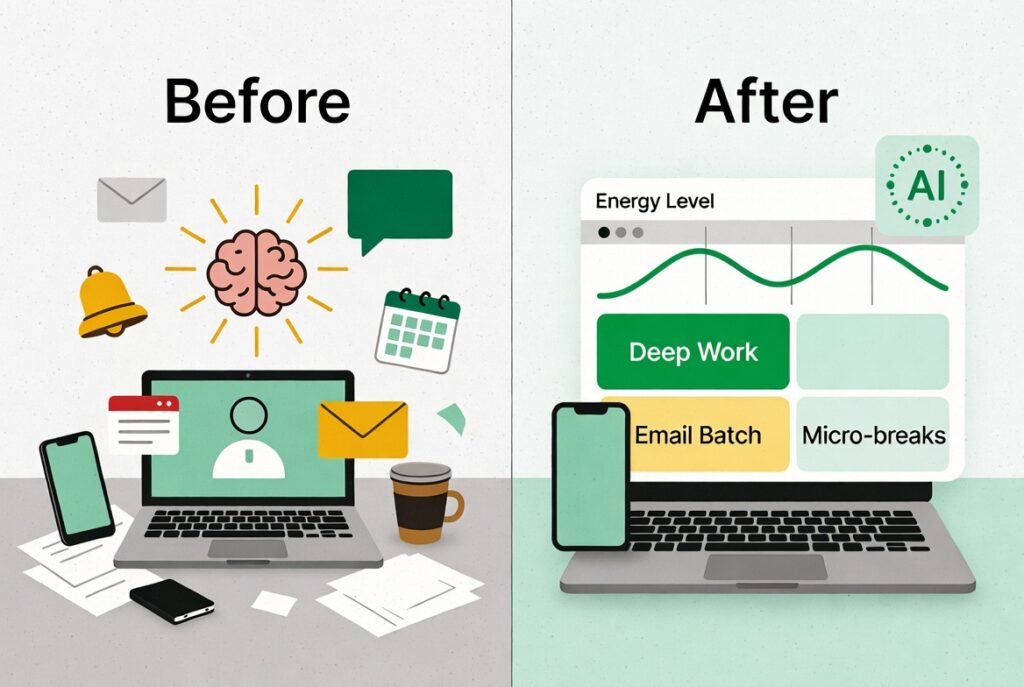
Schedule Work Around Your Energy, Not Your Clock
Forcing deep work during cognitive low points produces worse output in more time — and then you redo it
Most calendar advice assumes all hours are equivalent. Chronobiology research is consistent enough to say confidently: they aren’t. Cognitive performance, decision quality, and creative output fluctuate in predictable patterns tied to circadian rhythms and ultradian rest-activity cycles of approximately 90 minutes. These aren’t minor fluctuations — peak-to-trough differences in measured cognitive performance can exceed 20–30% within a single day.
The practical consequence of ignoring this: if you’re trying to write a strategy document during your post-lunch cognitive trough, you’re not just slower — the output itself is measurably worse, which often means you spend additional time revising it later. You’ve effectively doubled the time cost. Energy alignment isn’t a luxury or a lifestyle optimization; it’s a time efficiency play.
Identifying and protecting your peak
- Track your energy for one week using a simple hourly note: “9 AM: sharp / 1 PM: flat / 7 PM: creative.” Patterns typically emerge in three to four days.
- Assign deep work — writing, analysis, complex problem-solving, anything requiring sustained concentration — exclusively to your peak hours.
- Move shallow work (email, administrative tasks, routine reviews, scheduling) to your low-energy slots. That’s what those slots are for.
- Protect your peak block the way you’d protect a client meeting. “Just 15 minutes” requests during that window cost you far more than 15 minutes when you account for context-reload time on both ends.
One honest note on chronotypes: the 9–11 AM peak is common, not universal. Confirmed evening chronotypes exist and perform best later in the day. Roenneberg et al.’s chronotype research (published in Sleep and Biological Rhythms) is solid enough to take seriously. If you’re a night owl who forces an early-morning deep work block, you may be fighting biology in a way that costs you more than it saves. Data — your own data — beats assumptions about when you “should” be productive.
Template and Automate the Repetitive 20%
Roughly 50 days per year disappear into tasks you rebuild identically every week — this is the highest-ROI change on this list
Run this audit quickly: what did you do last week that you also did the week before, and will almost certainly do next week? Status updates in the same format, meeting notes with the same structure, follow-up emails with the same bones, expense reports, project briefs, grocery orders, booking recurring travel. If a task is structurally identical week to week, you’re rebuilding it from scratch every time — and that’s a choice, not a requirement.
The data on this is straightforward. A 2026 knowledge worker productivity review cited automation tools for routine tasks as saving an estimated 3.6 hours weekly — and that figure predates the current generation of AI drafting assistants that compress first-draft creation substantially. Build the template once. Use it indefinitely.
In 2026, the tooling to do this is genuinely accessible without technical skills. Zapier and IFTTT handle cross-app automation with drag-and-drop interfaces. Gmail and Outlook have native canned responses. Notion and Obsidian support reusable templates natively. AI tools built into most writing environments draft first versions of routine messages in seconds.
Where to start this week
- List your three to five most-repeated weekly tasks. Specificity matters: not “communication” but “writing client status updates in the same format each Friday.”
- Create a reusable template for each one in whatever tool you already use. Don’t introduce a new app for this — the friction of a new tool negates the efficiency gain.
- Set up one automation this week. Start small: a recurring calendar invite for your standing team meeting, an auto-reply template for your most common email type, or a grocery delivery subscription for household staples.
- Use AI drafting tools for first versions of routine messages — then edit and personalize before sending. The value is the 80% skeleton, not the fully generated output.
Don’t automate complex judgment calls, sensitive client communications, or anything where the specific human context changes the appropriate response. The goal is removing mechanical repetition from tasks where the structure is always the same. An automation that sends the wrong “routine” reply to the wrong person at the wrong moment costs far more to fix than the original task ever took.
Replace “Power Through” with Strategic Micro-Breaks
The post-lunch productivity collapse costs 60–90 min daily — structured rest prevents it more reliably than caffeine or willpower
The “power through” approach to focus doesn’t eliminate the afternoon cognitive collapse — it defers and amplifies it. By 3 PM you’ve burned your decision-making quality for the day, and everything from that point forward takes longer and produces worse results. The people who look like they have extraordinary focus often just have better break discipline, not better willpower.
The research on this is specific and well-replicated. The Albulescu et al. 2022 meta-analysis published in PLOS ONE — 22 independent study samples, 2,335 participants — found statistically significant benefits of micro-breaks for reducing fatigue and boosting vigor throughout the workday. The effect size was described as “small but consistent” (d=0.36), which in practical terms means micro-breaks reliably prevent fatigue accumulation without the session-interruption costs associated with unplanned distractions.
There’s an important nuance the same research uncovered: micro-breaks under 10 minutes can replenish energy and reduce fatigue, but may not fully restore cognitive capacity for highly demanding tasks. Meaning: a 5-minute walk helps you feel more alert, but after very depleting work, you may need a longer recovery period before deep cognitive performance is fully restored. Plan your break lengths accordingly.
The practical approach
- Work in 25–50 minute blocks, then take a genuine 5-minute break. “Genuine” means off-screen: walk around, stretch, look at something more than 20 feet away. Not social media. Not email.
- After every three to four work cycles, take a 15–20 minute longer reset — a short walk outside if possible, or offline time away from your desk entirely.
- Schedule one 60–90 minute “deep recovery” block mid-week: exercise, a nap, completely offline reading. This is infrastructure maintenance, not indulgence — skip it consistently and your Thursday and Friday output will show it.
The most common mistake: treating the break as a content opportunity. Five minutes of short-form video is not a break — it’s a different kind of cognitive stimulus that doesn’t discharge fatigue and often makes focus restoration harder. The recovery benefit comes from low-stimulation activities. If you’re going to scroll, do it in a dedicated window, not in your recovery windows.
Combined Time Recovery: Conservative Estimates
The five habits aren’t independent — they compound. Batching reduces context-switching losses; energy alignment ensures your batched deep-work blocks produce quality output; micro-breaks extend how long that quality holds. The Sunday Reset provides the scaffold that keeps the other four from drifting back to defaults under pressure.
| Habit | Primary mechanism | Weekly recovery | Full benefit |
|---|---|---|---|
| 01 Sunday Reset | Eliminates daily priority drift and reactive scrambling (60–90 min/day) | 4–6 hrs | Week 1 |
| 02 Task Batching | Reduces 40% productive-time drain from constant context switching | 3–5 hrs | Weeks 2–3 |
| 03 Energy Alignment | Deep work in peak hours; fewer quality failures and rework cycles | 3–4 effective hrs | After 1-wk tracking |
| 04 Templates & Automation | Eliminates mechanical rebuilding of structurally identical recurring tasks | 2–4 hrs | After 2-hr setup |
| 05 Micro-Breaks | Prevents afternoon cognitive collapse; extends quality focus window | 2–3 effective hrs | Immediate |
| All five compounding | Compound effect — energy alignment + batching + breaks reinforce each other | 8–14 hrs | 4–6 weeks |
First-Week Implementation Plan
Don’t implement all five simultaneously — that’s how systems collapse within two weeks. This sequenced rollout adds one habit per day, each building on the last. By Saturday you’ll have real data on what’s working and a concrete baseline to measure against.
Where This Is All Heading — and Which Habits Will Matter Most
These five habits reflect the current landscape, but the terrain is shifting fast enough that it’s worth naming what changes in the next 12–24 months — and what doesn’t.
AI agents will handle habit 04 almost entirely. The template-and-automate habit is the one most directly in the path of agentic AI. Deloitte’s research forecasts that by 2027, 50% of organizations using generative AI will launch agentic applications capable of complex work with limited oversight. For routine cognitive tasks — status updates, scheduling, first-draft generation, expense processing — AI agents won’t just provide templates; they’ll execute the task. The strategic implication: workers who invest now in clearly defining and systematizing their recurring tasks will transition to AI delegation faster and more effectively than those who’ve never examined what they actually repeat. Habit 04’s value shifts from “do it once” to “design the system once, then delegate it.”
The attention fragmentation problem is getting worse, not better. Gloria Mark’s data shows the average screen focus duration dropped from 2.5 minutes in 2004 to 47 seconds today — a 97% reduction over two decades. Gartner’s 2026 predictions note that cognitive skill atrophy from AI-assisted work may push 50% of organizations to require “AI-free” skills assessments by 2026 — a signal that decision-makers are starting to recognize the problem structurally, not just as individual productivity advice. Habits 01, 02, and 03 (planning, batching, energy alignment) become more valuable, not less, in an environment where AI handles more execution: the human value-add concentrates in depth of thinking and judgment quality, both of which require exactly the protected attention these habits create.
Async-first work culture is validating batching at the organizational level. IDC’s Future of Work 2026 research forecasts that 40% of G2000 job roles will involve direct interaction with AI systems by 2026, accelerating the shift to asynchronous workflows where the expectation of instant response — the primary enemy of batching — weakens. Companies like Doist and Zapier have already built organizational cultures around this principle. As more organizations adopt async-first communication norms, individual batching becomes easier to sustain and starts reinforcing itself at the team level rather than requiring individual willpower to maintain.
The core structural insight remains constant regardless of what the tooling does: human cognitive bandwidth is finite and non-fungible. The question in 2026 and beyond isn’t “how do I fit more in?” It’s “how do I protect the blocks of uninterrupted time where genuine thinking happens?” The answer to that question doesn’t change as AI absorbs more execution. If anything, it gets more important.
Frequently Asked Questions
“I’m already too busy — I don’t have time to plan.”
The Sunday Reset pays its 30-minute cost back within the first two days of the week by eliminating 60–90 minutes of daily reactive scrambling. The feeling of being too busy to plan is almost always a symptom of not planning — the chaos creates more chaos, and you mistake the noise for busyness. Try it for one week before concluding it doesn’t fit your schedule. If it genuinely doesn’t pay off by Wednesday, stop.
“My job is too unpredictable for fixed email windows.”
Batching works on a spectrum. If you genuinely can’t do twice-daily email windows, try three fixed windows instead of constant monitoring. Even reducing email checks from 50 to 15 per day produces a measurable cognitive overhead reduction — you don’t need the full system to get substantial benefit. Partial batching beats no batching by a significant margin.
“I’ve tried productivity systems before and they always fall apart after a few weeks.”
Most systems collapse because they’re motivation-dependent — they work when you feel inspired and break down when you don’t. These five habits are designed as structural changes: the Sunday Reset happens whether you feel like it or not; the email batch window is a calendar block that defaults to closed; the micro-break timer fires regardless of how you feel. Systems outperform willpower because systems don’t have bad days.
“What does the micro-breaks research actually say — I’ve seen that 2022 PLOS ONE study cited everywhere.”
The Albulescu et al. 2022 PLOS ONE meta-analysis (22 samples, N=2,335) found statistically significant but “small” effects on vigor and fatigue (Cohen’s d=0.36). The important nuance the summary versions usually skip: micro-breaks under 10 minutes reliably restore energy and reduce fatigue, but may not fully restore cognitive performance for highly demanding tasks. You’ll feel more alert — but after very depleting work, you may need longer recovery for full cognitive restoration. The research is solid. The effect is real. It’s not magic.
“My manager or team won’t respect my focus blocks.”
Start with the blocks you fully control — deep work before the team is active, personal admin, the Sunday Reset itself. As your reliability and output quality visibly improve (which typically happens within two to three weeks of consistent implementation), the conversation about protected focus blocks becomes much easier. If possible, track a baseline output metric before starting, then compare at week four. Numbers make the case where arguments about “focus” often don’t.
The Honest Conclusion
None of these habits are magic. None of them require a personality transplant or extraordinary discipline. They’re structural changes to when and how you work — not to how hard you try. The research on cognitive fragmentation is consistent enough across enough independent studies that the direction is reliable: fewer context switches, more batching, better energy alignment, deliberate rest. These changes reduce the invisible overhead currently consuming somewhere between a third and half of your productive capacity.
What they don’t fix is organizational dysfunction. If your company runs on back-to-back meetings, expects instant responses to every message, and treats deep thinking as something that happens in the margins of administrative tasks, individual habits hit a ceiling. These five habits maximize what’s within your individual control. For most knowledge workers, that ceiling is higher than they’ve been reaching — significantly higher. But the honest framing is: these are individual interventions in what is partly a structural problem. Both things can be true.
Start with the Sunday Reset this weekend. Not because it’s the most dramatic item on the list, but because it creates the scaffold that keeps the other four from drifting back to defaults when things get busy. The week it matters most — the chaotic week, the high-pressure week — is exactly when the Reset’s decision filter earns back its 30-minute cost many times over.
Pick any two habits from this list. Implement them without modification for seven days and note how many focused hours you actually recover. Most people are genuinely surprised — the hidden losses are larger than expected, which means the recovery is too. The goal isn’t a perfect system. It’s a better default.
The One Productivity Trick Billionaires Swear By
I Slept 4 Hours a Day for a Week —Here’s What Happened
You’re Paying for These Three Google Workspace Tools. You’re Not Using Them.
The Smartest Side Hustle for the AI-Driven World
The Hidden iPhone Features Apple Doesn’t Want You to Know in 2026
Digital Detox: Deliberate Disconnection for Focus & Well-being
Future Side Hustles That Pay More Than a Job
How Tech CEOs Hack Their Bodies for Energy